
Overview
With the amount of shit people feel the need to share with the internet, I am wondering if I can use Twitter to survey cases of the flu. To do this, I can use a Twitter API, tweepy, to scrape tweets and their locations based on key words. However, I will need a way to determine if the tweet is referencing a case of the flu, or is using the word in some other context. That’s where the machine learining comes in. In this notebook, I use a multinomial naive bayes classifier to pinpoint cases of the flu self-reported over Twitter.

Training Data
Here, I’m going stream all tweets with the word “flu” in it, cut out some of the baggage attached to those tweets, then append the tweets to a CSV that I’ll later go through and classify.
Once the tweets start rolling in, you can get an idea for how you want to do your classifications.
I ended up having three categories: “Accept”, “Reject”, and “Other”. The “Accept” category is for the tweets I want, the tweets that admit to having the flu. I made the “Other” category because I noticed that swine and bird flu came up very frequently. I thought that the high frequency of unaccapted tweets having bird or swine flu in it would result in the acceptance of basically any tweet that did not have bird or swine in them.
The below script shows how I scraped/parsed the data.
from tweepy import Stream
from tweepy import OAuthHandler
from tweepy.streaming import StreamListener
import json
import re
import time
import os
import sys

module_path = os.path.abspath(os.path.join('/Users/macuser/PycharmProjects/td2'))

if module_path not in sys.path:
    sys.path.append(module_path)

from myAccess import consumerKey, consumerSecret, accessToken, accessSecret

#AccessCodes
consumerKey = consumerKey
consumerSecret = consumerSecret
accessToken = accessToken
accessSecret = accessSecret

#Scraping/Parsing Tweets for Training
class Listener(StreamListener):
    def on_data(self, raw_data):
        try:
            jsonData = json.loads(raw_data) #Convert Tweet data to json object
            text = jsonData['text'] #Parse out the tweet from the json object
            if not jsonData['retweeted'] and 'RT @' not in text and jsonData['lang'] == 'en': #Excludes Retweets
                text = re.sub(r"(http\S+|#\b)", "", text) #Gets rid of links and the # in front of words
                text = " ".join(filter(lambda x:x[0]!='@', text.split())) #Gets rid of the @ in front of mentions
                text = text.encode('unicode-escape').decode(encoding='utf-8').replace('\\', ' ') #Converts Emojis to a String
                text = text.replace('u2026','') #Gets rid of ellipses
                text = text.replace('"',"'") #Replaces " with ' so that it doesn't break the field when read from CSV
                print(text)
                with open('tdTraining.csv', 'a') as file: #Write to CSV
                     file.write('\n'+'"'+text+'"'+',') #Adds quotes around tweet to set the field
        except BaseException as e:
            print("Failed ondata,", str(e))
            time.sleep(0.1)
    def on_error(self, status_code):
        print(status_code)

#Access
auth = OAuthHandler(consumerKey, consumerSecret)
auth.set_access_token(accessToken, accessSecret)

#Initiate Streaming
twitterStream = Stream(auth, Listener())
twitterStream.filter(track = ["flu"])
Training the Classifier
I ended up classifying about 3,000 tweets over the course of about a week. Generally, your corpus should contain around 50,000 documents. Proabably more for tweets since they are so small. Nonetheless, I got sick of classifying and decided to move on.
First thing to do is load our tweets and their classifications. I’ll store them in a pandas dataframe.
import pandas as pd
trainingData = pd.read_csv('/Users/macuser/PycharmProjects/td2/tdTraining.csv', quotechar='"')
print(trainingData.head(10))
Now we need to build a pipeline. First, the text needs to be tokenized, which we can do with scikit’s countvectorizer. The gram size is the number of words that get chunked together e.g.
“The sky is blue”
- unigrams: “The”, “sky”, “is”, “blue”
- bigrams: “The sky”, “is blue”, “sky is”
- trigrams: “The sky is”, “sky is blu”
Generally, a gram size of two is optimal in terms of improving accuracy and cpu exertion, but play around with it nonetheless.
Second, convert word counts to frequency with tfidftransformer. This accounts for the over-appearance of words in large bodies of text. This is not a huge deal for us since tweets are limited to 144 characters, but it is almost always done in building text classifiers and it still improves accuracy by a few percentage points.
Next is choosing the algorithm and, subsequently, its parameters. Most text classifiers use either the multinomial naive bayes algorithm or a support vector classifier, others to experiment with may include: random forest, bernoulli naive bayes, or stochastic gradient descent.
Since I’m using the mNB classifier, I’ll talk about it some. The mNBc looks at each token independently and associates with a class based on the frequency it appears in said class. This factors in to the conditional probability- the liklihood that a text belongs to a class given its the overall association its token’s have with that class. The other thing the mNBc takes into account is the prior distribution of classes. This simply means that the classifier will be biased to assign texts to classes that appeared more often than others in the training data.
Scikit’s mNB will automatically calculate priors, but I found that my custom priors led to 2-3% higher accuracy. The other paramater, alpha, is a smoothing parameter that adds an equal and small probability for never-before-seen words to associate with all classes.
Here’s the full pipeline for the classifier:
from sklearn.feature_extraction.text import CountVectorizer, TfidfTransformer
from sklearn.pipeline import Pipeline
from sklearn.naive_bayes import MultinomialNB

text_clf = Pipeline([('vect', CountVectorizer(ngram_range=(1,2))),
                      ('tfidf', TfidfTransformer()),
                      ('clf', MultinomialNB(alpha=1,class_prior=[.27,.45,.28]))])
Now split the data into training and testing sets, then train/test the classifier.
from sklearn import cross_validation
featureTrain, featureTest, labelTrain, labelTest = cross_validation.train_test_split(
    trainingData['text'], trainingData['cat'],test_size=0.20)
fit = text_clf.fit(featureTrain, labelTrain)
Getting the results.
accuracy = text_clf.score(featureTest, labelTest)
predictions = text_clf.predict(featureTest)
crossTable = pd.crosstab(labelTest, predictions, rownames=['Actual:'], colnames=['Predicted:'], margins=True)
falsePos = sum(crossTable['Accept'].drop('All').drop('Accept')) / crossTable['Accept']['All']
falseNeg = (crossTable['Other']['Accept'] + crossTable['Reject']['Accept'])/\
           (crossTable['Other']['All'] + crossTable['Reject']['All'])
print("Accuracy:",accuracy)
print(crossTable)
print("False Positives:",falsePos,'\n',"False Negatives:",falseNeg)
I like to throw all this in a for loop to get an average accuracy over n runs and add a confustion matrix.
accuracy = []
fP = []
fN = []
for i in range(100):
    featureTrain, featureTest, labelTrain, labelTest = cross_validation.train_test_split(
        trainingData['text'], trainingData['cat'], test_size=0.20)
    fit = text_clf.fit(featureTrain, labelTrain)
    test = text_clf.score(featureTest, labelTest)
    predictions = text_clf.predict(featureTest)
    crossTable = pd.crosstab(labelTest, predictions, rownames=['Actual:'], colnames=['Predicted:'], margins=True)
    falsePos = sum(crossTable['Accept'].drop('All').drop('Accept')) / crossTable['Accept']['All']
    falseNeg = (crossTable['Other']['Accept'] + crossTable['Reject']['Accept'])/\
           (crossTable['Other']['All'] + crossTable['Reject']['All'])
    accuracy.append(test)
    fP.append(falsePos)
    fN.append(falseNeg)

print("Accuracy:",sum(accuracy)/float(len(accuracy)))
print("False Positives:",sum(fP)/float(len(fP)))
print("False Negatives:",sum(fN)/float(len(fN)))
Roughly 80%, that’s OK considering our small sample size (one of the benefits of the mNBc is that it works well on small sample sizes). You can use the false positves/negatives to tweak your priors. If you think there’s too many false positives for a particular class, lower the prior distribution for that class.
Let’s test out the classifier.
text = "I have the flu" #Should be.......Accept
text2 = "My sister has the flu"#.........Reject
text3 = "I had the flu last month."#.....Reject
text4 = "Top 10 ways to treat the flu."#.Reject
text5 = "Dog flu outbreak."#.............Other
print(text_clf.predict([text,text2,text3,text4,text5]))
Looks like the classifier is working pretty good, but I did throw it some softball questions.
The next step is to save the classifier to a pickle object so i don’t have to retrain it.
import pickle
saveClassifier = open("tdMNB.pickle","wb")
pickle.dump(fit, saveClassifier)
saveClassifier.close()
Now that we have a trained classifier, we can start classifying some tweets.
Streaming Tweets
Now we are at the point where we can start filling out our databse. The following script is similar to the “Training Data” script only now we need to get location information, classify the tweet, and save to a database instead of a CSV. I’m using a module called geopy to to find latitude and longitude coordinates from the location information provided with the tweet. If the location is valid and in the US, we then classify the tweet. If it returns an “Accept” classification, it is saved to a SQLite database with its coordinates, the datetime of the tweet, and the tweet ID (for cross-referencing and primary key).
Edit: I did this about 8 months ago and have no idea why I used a sql db over a csv, lol.
from tweepy import Stream, OAuthHandler
from tweepy.streaming import StreamListener
import os
import sys

module_path = os.path.abspath(os.path.join('/Users/macuser/PycharmProjects/td2'))

if module_path not in sys.path:
    sys.path.append(module_path)

import time, json, sqlite3, re, myAccess
from geopy.geocoders import Nominatim
from time import mktime
from datetime import datetime
import pickle

#ConnectingDB
conn = sqlite3.connect('twitterdemiologyDB.db')
c = conn.cursor()

#CreatingTable
c.execute('CREATE TABLE IF NOT EXISTS Main(id TEXT, date DATETIME, lat TEXT, lon TEXT)')

#AccessCodes
consumerKey = myAccess.consumerKey
consumerSecret = myAccess.consumerSecret
accessToken = myAccess.accessToken
accessSecret = myAccess.accessSecret

#Loading Classifier
classifierF = open("tdMNB.pickle","rb")
classifier = pickle.load(classifierF)
classifierF.close()

#Scraping/ParsingTweets
class Listener(StreamListener):

    def on_data(self, raw_data):
        try:
            jsonData = json.loads(raw_data)
            #Converting date to datetime format:
            date = jsonData['created_at']
            date2 = str(date).split(' ')
            date3 = date2[1]+' '+date2[2]+' '+date2[3]+' '+date2[5]
            datetime_object = time.strptime(date3, '%b %d %H:%M:%S %Y')
            dt = datetime.fromtimestamp(mktime(datetime_object))
            #Parsing out ID, the tweet itself, and location:
            tweetID = jsonData['id_str']
            pretweet = jsonData['text']
            userInfo = jsonData['user']
            location = userInfo['location']
            if jsonData['lang'] == 'en' and location != 'Midwest' and location!= 'Whole World' and location != 'Earth':
                #print(dt, pretweet, location)
                geolocator = Nominatim()
                geolocation = geolocator.geocode(location)
                try:
                    #The 2-5 len range helps to remove inaccurate/unspecific locations
                    if "United States of America" in geolocation.address[::] and 5>= len(geolocation.address.split(",")) > 2 :
                        lat = geolocation.latitude
                        lon = geolocation.longitude
                        print(geolocation.address, '\n', lat, lon)
                        if not jsonData['retweeted'] and 'RT @' not in pretweet:
                            tweet = re.sub(r"(http\S+|#\b)", "", pretweet)
                            tweet = " ".join(filter(lambda x: x[0] != '@', tweet.split()))
                            tweet = str(tweet.encode('unicode-escape')).replace('\\', ' ')
                            print(tweet)
                            classification = classifier.predict([tweet])[0]
                            if classification == 'Accept':
                                print("Tweet Accepted")
                                c.execute('INSERT INTO Main(id, date, lat, lon) VALUES(?,?,?,?)',
                                          (tweetID, dt, lat, lon))
                                conn.commit()
                            else:
                                print("Tweet Rejected")
                        else:
                            print("Is a Retweet")
                    else:
                        print("Location not in USA")
                except Exception as e:
                    print("Invalid locaion:", str(e))
        except BaseException as e:
            print("Failed ondata,",str(e))
            time.sleep(0.1)
    def on_error(self, status_code):
        print(status_code)

#Access
auth = OAuthHandler(consumerKey, consumerSecret)
auth.set_access_token(accessToken, accessSecret)

#InitiateStreaming
twitterStream = Stream(auth, Listener())
twitterStream.filter(track=['flu'])
Most of the tweets that come in are rejected do to invalid locations. Of the valid locations, about %30 are classified as “Accept” and enter the database. I get about 100 useable tweets/day (it’s currently Summer, will probably get a lot more come Winter.
Mapping the Data
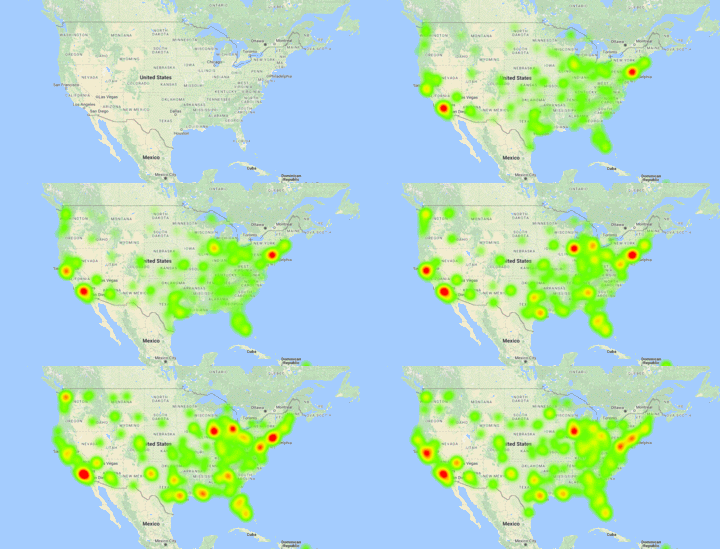
What I’m going to do here is plot the data onto a heatmap. This loop will create heatmaps 1 day at a time containing the past 7 days of data. I used the module gmap to create the heatmaps.
import sqlite3
import gmplot
from datetime import timedelta
from datetime import datetime


#ConnectingToDB
conn = sqlite3.connect('twitterdemiologyDB.db')
c = conn.cursor()

#QueryingData
scanner = str('2017-06-22 10:59:25')
for i in range(10): #Number of days that the data spans I just put 10 becuase I don't want a
                    #bunch of html files in my dir (I already made them)
    tail = str(datetime.strptime(scanner, '%Y-%m-%d %H:%M:%S') - timedelta(hours=168))
    c.execute('SELECT lat, lon FROM Main WHERE date > "{x}" AND date < "{y}"'.format(x=tail,y = scanner))
    latArray = []
    lonArray = []
    for row in c.fetchall():
        if row[0] and row[1]:
            latArray.append(float(row[0]))
            lonArray.append(float(row[1]))
    #MappingData
    file = 'flu' + str(scanner) + '.html'
    gmap = gmplot.GoogleMapPlotter.from_geocode("United States")
    gmap.heatmap(latArray, lonArray)
    gmap.draw(file)
    scanner = str(datetime.strptime(scanner, '%Y-%m-%d %H:%M:%S') + timedelta(hours=24))
a timelapse of flu cases over time.
There are packages such as imgkit that will take a screenshot of html files and
save them as png’s, but I could not get them to work with gmaps (they worked for other html files, though)
so I just manually screenshotted them with chrome addon.
Here is the final result:
 Piper Writes
Leave a comment